A beautiful 🤩 Chrome Extension that adds additional features and gives an overall better experience for SEQTA Learn.Currently looking for contributors 🔥
## Table of contents
- [Features](#features)
- [Creating Custom Themes](#creating-custom-themes)
- [Getting Started](#getting-started)
- [Running Development](#running-development)
- [Building for production](#building-for-production)
- [Folder Structure](#folder-structure)
- [Contributors](#contributors)
- [Credits](#credits)
- [Star History](#star-history)
## Features
- Dark mode
- Custom Background/Themes
- Improved Styling/CSS
- Improved look for SEQTA Learn
- Custom Home Page including:
- Daily Lessons
- Shortcuts
- Easier Access Notices
- Assessments
- Options to remove certain items from the side menu
- Fully customisable themes and an offical theme store
- Notification for next lesson (sent 5 minutes before end of the lesson)
- Browser Support
- Chrome Supported
- Edge Supported
- Brave Supported
- Opera Supported
- Vivaldi Supported
- Firefox (Experimental - available [here](https://addons.mozilla.org/en-US/firefox/addon/betterseqta-plus/)
- Safari (Experimental - only available via compilation)
## Creating Custom Themes
If you are looking to create custom themes, I would recommend you start at the official documentation [here](https://betterseqta.gitbook.io/betterseqta-docs). You can see some premade examples along with a compilation script that can be used to allow for CSS frameworks and libraries such as SCSS to be used [here](https://github.com/SethBurkart123/BetterSEQTA-theme-generator).
Don't worry- if you get stuck feel free to ask around in the discord. We're open and happy to help out! Happy creating :)
## Getting started
1. Clone the repository
```
git clone https://github.com/BetterSEQTA/BetterSEQTA-Plus
```
### Running Development
1. Install dependencies
```
npm install # or your preferred package manager like pnpm or yarn
```
2. Run the dev script (it updates as you save files)
```
npm run dev
```
3. Load the extension into chrome
- Go to `chrome://extensions`
- Enable developer mode
- Click `Load unpacked`
- Select the `dist` folder
Just remember, in order to update changes to the extension, you need to click the refresh button on the extension in `chrome://extensions` whenever anything's changed.
### Building for production
1. Install dependencies
```
npm install # or your preferred package manager like pnpm or yarn
```
2. Run the build script
```
npm run build
```
3. Package it up (optional)
```
npm run zip # This requires 7-Zip to be installed in order to work
```
## Folder Structure
The folder structure is as follows:
- The `src` folder contains source files that are compiled to the build directory.
- The `src/interface` folder contains source React files that are required for the Settings page.
- The `dist` folder is where the compiled code ends up, this is the folder what you need to load into chrome as an unpacked extension for development.
## Contributors
Want to contribute? [Click Here!](https://github.com/BetterSEQTA/BetterSEQTA-Plus/blob/main/CONTRIBUTING.md)
## Credits
This extension was initially developed by [Nulkem](https://github.com/Nulkem/betterseqta), was ported to manifest V3 by [MEGA-Dawg68](https://github.com/MEGA-Dawg68) and is currently under active development by [SethBurkart123](https://github.com/SethBurkart123) and [Crazypersonalph](https://github.com/Crazypersonalph)
## Star History
[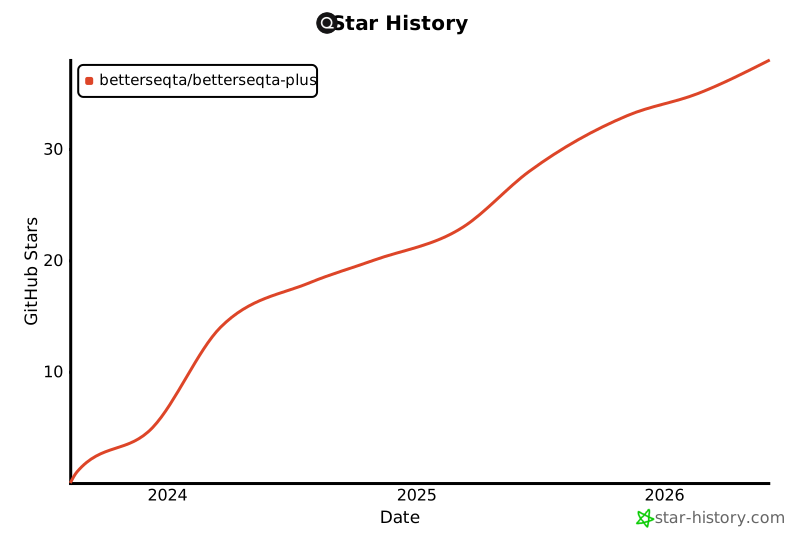](https://star-history.com/#sethburkart123/EvenBetterSEQTA&Date)


